Most companies that leave an outsourced outbound partner make the decision for good reasons and then execute it badly. The decision takes a quarter of frustration. The execution takes one email giving thirty days’ notice, and the damage shows up six weeks later, when the pipeline report has a hole in it nobody can explain.
The hole is almost never the new partner’s fault. It is the predictable result of treating a running outbound engine as a service you can cancel, rather than as infrastructure you are moving. Domains, mailboxes, LinkedIn identities, lists, suppression records and half-finished conversations all have to go somewhere. If nobody decides where, they go nowhere.
This is the playbook for doing it properly, whether you are moving to another partner, bringing outbound in-house, or moving to us.
The Short Version
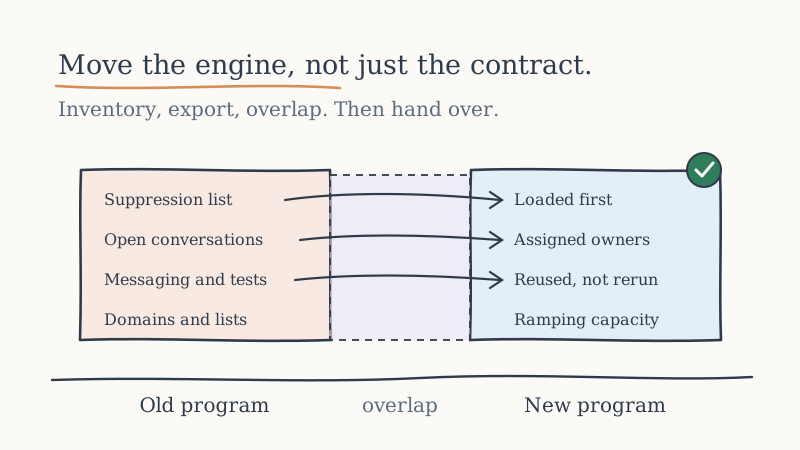
Before you give notice, inventory every asset the current program runs on and confirm in writing who owns each one. Export the suppression list and every open conversation first, because those are the two things that cannot be rebuilt. Run the old and new programs in overlap rather than back to back, with a hard rule that no prospect is contacted by both. Measure the transition on meetings held and open conversations carried over, not on how quickly the new team launches.
If you only do one thing, get the suppression list out before anything else. Everything else on this page can be recovered with time. Emailing people who asked you to stop cannot.
Why Transitions Lose Pipeline
Outbound pipeline is not created on the day a meeting books. It is created over weeks, in conversations that are partway through. At any moment a running program holds prospects who replied “not this quarter,” prospects mid-way through a scheduling back and forth, prospects who were referred to a colleague, and prospects who said “send me something” and are waiting for it.
When a program stops abruptly, every one of those conversations stops with it. The new partner starts from a cold list, sends first touches, and waits for replies. Even if the new team is excellent, there is a gap between the last meeting the old program books and the first meeting the new one books, and that gap is the pipeline you lost.
Three things make the gap worse than it needs to be:
Asset ambiguity. Nobody wrote down who owns the sending domains, the mailboxes, or the LinkedIn profiles, so on the last day they simply stop working.
Conversation abandonment. Open threads live in an inbox the old partner controls. When access is revoked, the threads go with it.
Double contact. The new program loads a list that overlaps with prospects the old program contacted last week. The prospect hears from two vendors on your behalf, in two voices, and you look disorganized to exactly the people you were trying to impress.
All three are preventable, and none of them requires the old partner to be especially cooperative, as long as you start before you give notice.
Step 1: Inventory the Engine Before You Give Notice
The moment you give notice, your leverage to get clean exports drops. Do the inventory first, quietly, using the access you already have.
| Asset | What to confirm | Why it matters |
|---|---|---|
| Sending domains | Who is the registrant, and can the domains be transferred | Aged domains take time to replace |
| Mailboxes | Which tenant they live in and who administers it | Mailboxes in a partner’s tenant usually do not move |
| LinkedIn identities | Whose accounts are sending, and on whose behalf | Some programs send from your team’s profiles, some from operated identities |
| Contact lists and enrichment | Whether you can export what was built for you | Rebuilding a list is cost, not just time |
| Suppression list | Every unsubscribe, bounce, do-not-contact and opt-out | The one asset you cannot recreate |
| Open conversations | Every thread with a reply in the last ninety days | This is your in-flight pipeline |
| Messaging and test results | Sequences, offers, what was tested and what lost | Saves the new team from rerunning failed tests |
| CRM records | Activities and meetings logged against your accounts | Attribution and history |
Some of these will be yours by contract and some will not. That is fine. The point of the inventory is to know which is which before the clock starts, not to win every line. Our post on outsourced SDR contract clauses to negotiate before signing covers how to settle ownership at the start of a relationship, and if you are reading this before you sign with anyone, that is the better place to begin.
Step 2: Separate What Moves From What Gets Rebuilt
Once the inventory exists, sort every line into one of three buckets.
Moves with you. Data you own and can export: lists, suppression records, CRM history, messaging, open conversations. These should transfer in full. Ask for them in a structured format your next team can load, not a PDF.
Stays behind and gets rebuilt. Infrastructure that belongs to the outgoing partner, typically mailboxes inside their tenant and sometimes the domains themselves. This is normal and not a sign of bad faith. It does mean the new program needs time to stand up its own sending capacity, and that time has to be planned. New domains need to age and new mailboxes need to ramp before they carry real volume, which we covered in the domain warmup timeline for new sending domains.
Retired on purpose. Anything that should not continue at all: a list segment that never converted, a sending domain with a damaged reputation, a sequence that drew complaints. A transition is the cheapest moment you will ever get to stop doing something.
The rebuild bucket is what sets the length of the overlap. If the new program needs several weeks before its infrastructure can carry volume, the old program needs to keep running for those weeks, or you accept a gap.
Step 3: Get the Suppression List Out First
This deserves its own step because it is the one with real consequences.
Your suppression list is the record of every person who unsubscribed, asked not to be contacted, hard bounced, or was flagged as a do-not-contact for a business reason, such as an existing customer or an active deal. If the new program launches without it, it will contact some of those people again. At best that is embarrassing. At worst it is a compliance problem and a burst of spam complaints on brand-new domains, which is the fastest way to ruin infrastructure that has not finished warming.
Ask for the full suppression export before anything else, merge it with your own CRM opt-outs, and load it into the new program before the first send. Our guide to suppression list management for cold outbound covers the categories worth keeping and how to structure them so they survive the next transition too.
Step 4: Rescue the Open Conversations
The second asset you cannot recreate is the set of prospects who are mid-conversation. Export every thread with a reply in the last ninety days, and classify them before handover:
- Meeting booked, not yet held. Confirm who will attend and make sure the calendar invite survives the mailbox change.
- Actively scheduling. Finish these on the old infrastructure if at all possible. Switching sender mid-negotiation loses meetings.
- Deferred. “Come back in Q1” and similar. These go to the new team with the original context and a date.
- Referred. A prospect who pointed you to a colleague. The colleague is a warm lead and should be handled first.
- Asked for information. Someone who is waiting to hear back. Respond before the transition, not after.
If replies across email and LinkedIn are already landing in one inbox your team controls, this step is far easier, because the conversations never lived only in the partner’s tools. That is the job a unified inbox such as Underfive does: email and LinkedIn replies in one place, classified, wired to the CRM, and owned by you rather than by whichever vendor is sending this quarter.
Step 5: Run an Overlap, Not a Relay
The instinct is to end the old program on the day the new one starts. That is a relay, and relays drop the baton.
An overlap works better. The outgoing program keeps working its existing conversations and its remaining in-flight sequences, but stops loading new prospects. The incoming program starts on new prospects only, on infrastructure that is ramping. For a period, both run.
The rule that makes an overlap safe is simple and absolute: no prospect is in both programs. Enforce it with a shared exclusion list that each side checks before every send. The new program’s first list should be built after the old program’s recent contacts are excluded, not before.
Decide in advance when the overlap ends. A reasonable trigger is when the old program’s open conversations have been resolved or handed over, and the new program’s infrastructure is carrying planned volume. A trigger based on events is better than one based on the calendar, because it ends the overlap when the work is actually done.
Step 6: Measure the Transition Honestly
A new partner will want to show early activity, and early activity is easy to show. Sends, connection requests, first-touch replies. None of that tells you whether the transition worked.
The numbers that do:
- Meetings held per week, across both programs combined. If this dips sharply, you have a gap, whatever the activity metrics say.
- Open conversations carried over and resolved. How many of the exported threads ended in a meeting, a clear no, or a dated follow-up. A thread that silently dropped is lost pipeline.
- Double-contact incidents. Should be zero. Any non-zero number means the exclusion list is not being checked.
- Spam complaints and bounces on new infrastructure. A spike in the first weeks usually means the suppression list or verification was skipped. Running the first lists through Scrubby, which safely clears catch-all email, before they touch a new domain removes one common cause.
If you need a framework for judging the new partner once the transition is complete, our post on early warning signs an outsourced outbound partner is underperforming applies just as well to the partner you are moving to as to the one you are leaving.
The Handover Checklist
Print this, or paste it into the ticket you open on the day you decide to move.
- Asset inventory complete, with an owner named for every line
- Suppression list exported, merged with CRM opt-outs, and loaded into the new program
- Open conversations exported, classified, and assigned
- Booked meetings confirmed with attendees and invites that survive the change
- Messaging, offers and test history handed to the new team
- New sending infrastructure provisioned and ramping before the old program stops loading prospects
- Shared exclusion list live and checked by both sides before every send
- Overlap end trigger agreed in writing
- Combined meetings-held number reviewed weekly until the overlap ends
- Ownership terms for the new program settled before its first send, so the next transition is easier
The Point of All This
The reason transitions hurt is that most outbound programs were never set up to be moved. Assets live in someone else’s tenant, conversations live in someone else’s inbox, and nobody wrote down who owns what. Fixing that during a transition is painful. Fixing it at the start of a program costs almost nothing.
Whoever runs your outbound next, insist that ownership is written down on day one, that suppression and conversation data are always exportable, and that your team can see every reply. It is the same standard we hold ourselves to in our managed programs, because a partner you could not leave cleanly is not a partner you chose freely. If you are planning a move and want to talk it through, book time with the Vendisys team.