Most outbound teams treat their contact list as a fixed asset. You buy it, or build it, load it into the sequencer, and assume it holds its value until you send. It does not. A B2B contact list starts losing accuracy the moment it is sourced, and by the time a slow-moving team gets around to using it, a meaningful slice is already wrong.
This is data decay, and it is one of the quietest killers in outbound. Nobody sees it happen. Your list looks the same in the CSV as it did the day you exported it. But the world behind those rows keeps moving: people change jobs, companies rebrand, mailboxes get deactivated, and domains get retired. The data does not update itself.
What data decay actually is
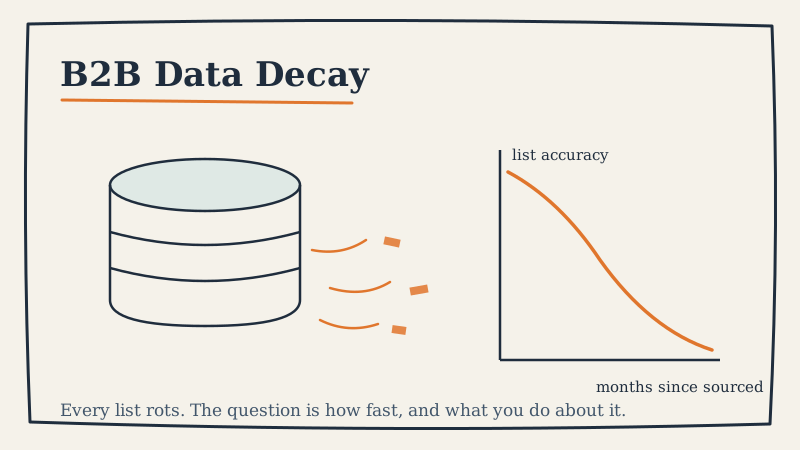
Data decay is the gradual erosion of accuracy in a contact record over time. A record can decay in several ways at once:
- Role decay: the person left the company or changed titles, so your personalization and targeting are now aimed at the wrong job.
- Email decay: the mailbox was deactivated, the email format changed, or the domain was retired, so your message bounces or lands nowhere.
- Company decay: the business was acquired, merged, renamed, or shut down, so the account itself no longer matches your ICP.
- Intent decay: a signal that made an account worth contacting (a funding round, a hire, a tech install) is now months old and no longer fresh.
The first two are the ones that hit outbound hardest, because they directly attack deliverability. A bounced send is not just a wasted email. It is a negative signal to mailbox providers that erodes the reputation of your whole sending domain.
How fast does B2B data actually decay
The commonly cited figure is that B2B contact data decays at roughly 2 to 2.5 percent per month, which compounds to somewhere around 25 to 30 percent per year. Treat those as directional, not gospel, because the real rate depends heavily on your segment.
Some patterns hold up across most datasets:
- Job changes are the biggest driver. In fast-moving categories like tech and startups, annual role turnover can run well above 20 percent. Every one of those moves potentially invalidates a title, an email, and a reporting line.
- Seniority matters. Senior contacts change roles less often but do so more disruptively, taking their email address and sometimes their whole team with them.
- Company stage matters. Early-stage companies rebrand, pivot, and change domains far more often than mature enterprises, so a list heavy on startups decays faster.
- Sourcing method matters. A list scraped once and never refreshed decays on a straight line. A list pulled from a continuously updated provider decays more slowly but never reaches zero.
The takeaway is not the exact percentage. It is that a list you sourced six months ago and never touched is materially worse than the one you thought you had.
Why decay quietly wrecks outbound performance
Here is the failure mode. You load a list that is 12 percent stale. You send. A chunk of those sends bounce. Mailbox providers read the bounce rate as a spam signal and start routing more of your legitimate mail to the spam folder. Now even your accurate contacts stop seeing you. Reply rates fall, and the natural reaction is to blame the copy or the offer.
The copy was probably fine. The list rotted underneath it.
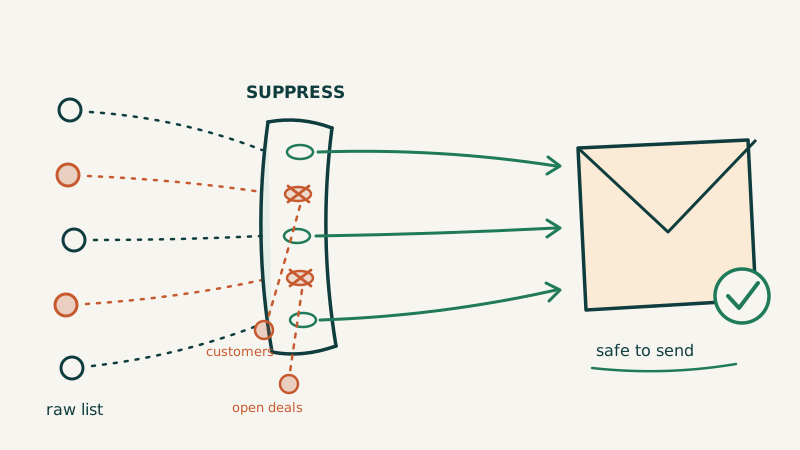
This is why deliverability and data hygiene are the same problem wearing two hats. You cannot out-write a dirty list. Before a single send, the list needs to be verified so that dead and risky addresses never get a chance to damage your domain reputation. Running your list through an email validation layer like Scrubby catches the deactivated mailboxes, catch-all traps, and malformed addresses that decay leaves behind, so your sends land on real inboxes instead of burning your sender score. If you want the deeper mechanics of how bounces translate into placement problems, our guide to cold email deliverability walks through it.
How to measure decay instead of guessing
You do not need a data science team to get a handle on decay. You need to instrument a few numbers and watch them over time.
- Hard bounce rate per campaign. This is your most direct decay signal. A creeping bounce rate on lists of similar age tells you decay is outrunning your hygiene process. Keep it under 2 percent and investigate anything above 3.
- Time-to-send. Track how many days pass between when a record was sourced and when it was first contacted. The longer that gap, the more decay you have baked in before you ever hit send. Shrinking this gap is one of the cheapest wins available.
- Reachability decay by cohort. Group records by the month they were sourced and measure what percentage still validate as deliverable today. The slope between cohorts is your effective decay rate for your specific data.
- Role-match rate. Periodically sample records and check whether the person is still in the targeted role. This catches role decay that email validation alone will miss.
Once you can see these numbers, decay stops being a vague worry and becomes a metric you can manage.
A practical cadence to keep lists fresh
Fresh data is not a one-time cleanup. It is a maintenance rhythm. Here is a cadence that works for most outbound programs:
- At sourcing: validate every record before it enters the sequencer. This is non-negotiable. The cheapest bounce to avoid is the one that never enters your system.
- Before every campaign: re-verify any record that has been sitting for more than 30 days. A list that passed validation in April is not the same list in July.
- Monthly: re-validate your active database and suppress anything that now bounces or flags as risky. Move genuinely dead records to a dead-data table rather than deleting them, so you do not re-source and re-burn the same addresses later.
- Quarterly: run a role-match audit on your highest-value accounts. Email validation confirms the address works; it does not confirm the person is still the right buyer.
- Continuously: shrink time-to-send. The single most effective decay reducer is contacting good data while it is still good.
Speed is the theme running through all of it. Decay is a function of time, so the faster you move from sourcing to send, the less decay you absorb. Managed programs that combine a continuously refreshed data layer with fast sequencing, like the outbound infrastructure Vendisys runs for its clients, exist largely to compress that window and keep hygiene automatic rather than a task someone remembers to do. If job changes are your biggest source of decay, they are also an opportunity: a former champion in a new role is often your warmest possible lead, and our post on how to re-engage closed-lost deals covers how to work those signals.
The bottom line
Data decay is not a rare event you can ignore. It is a constant force acting on every list you own, quietly turning good contacts into bounces and wasted sends. You will never stop it entirely, but you can measure it, slow it, and keep it from silently torching your deliverability.
The teams that win at outbound are not the ones with the biggest lists. They are the ones with the freshest ones. Validate before you send, re-verify before you re-send, and treat your contact database as a living thing that needs maintenance, not a static file you bought once and trusted forever.